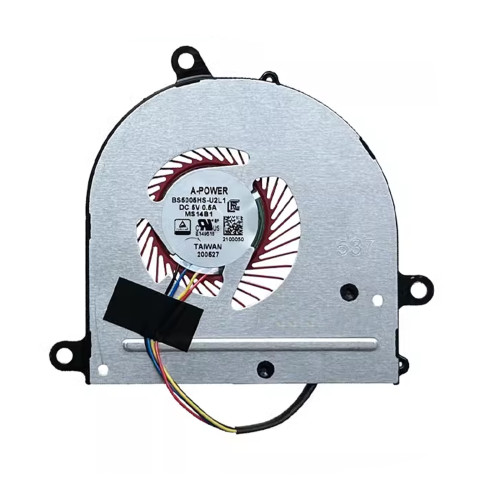
MSI PE42 PS42 MS-14B2 MS-14B1 MECHREVO S1-01 S1-02 S1-03 S1-04 MX150 Fan original

SKU: LT-16612 In Stock
US $8.60
Model / PN PE42
Condition NEW
Location shenzhen,China

Related Products

Replacement Fan – Brand & Part Number Guide

MSI PE42 PS42 MS-14B2 MS-14B1 MECHREVO S1-01 S1-02 S1-03 S1-04 MX150 Fan original (Part Number: PE42) is a high‑quality replacement cooling fan engineered for laptop thermal systems. This fan is manufactured to meet the specifications of major OEM brands such as Delta, Sunon, Nidec, AVC, Foxconn, and others. Proper identification of your original fan's brand and part number (PN) is the most reliable way to ensure a perfect match.

Technical Specifications:

  • Part Number / PN: PE42
  • SKU: LT-16612
  • Product Status: Brand New
  • Warranty: 90‑day replacement

Why Brand & PN Matter:

  • Different brands, different tooling – even if the voltage and connector look the same, the mounting hole positions, fan blade design, and thickness can vary between manufacturers. Always compare physical appearance.
  • PN is the fingerprint – the part number (e.g., EG50060S1-C710-S9A) uniquely identifies the exact fan model. Matching PN guarantees fitment.
  • OEM vs. Aftermarket – original fans (Delta, Sunon, etc.) are typically more durable and quieter, while aftermarket options offer cost savings for older laptops.
  • Sticker variations – the label may change slightly over time, but the underlying PN remains the key identifier.

How to Identify Your Fan:

  • Remove the fan from your laptop (refer to your service manual).
  • Find the manufacturer's logo (Delta, Sunon, Nidec, etc.) and the full part number printed on the sticker.
  • Compare the connector type, pin count, and wire color with our product photos.
  • Check the voltage (V) and current (A) – these must match your motherboard's fan header.

Still unsure? Take a clear photo of your fan's sticker (top view) and the connector, then send it to our support team. We'll identify the brand and PN for you, and confirm compatibility.
⚠️ Brand & Part Number (PN) Compatibility Check
Your replacement fan must match the original fan's brand, part number, voltage, connector, and physical dimensions.
Different manufacturers (Delta, Sunon, Nidec, AVC, etc.) may produce fans that look similar but have different mounting hole positions and thickness.
Always verify the full part number on your original fan sticker before ordering. When in doubt, send us a photo of your fan for verification.
Fan quality testing

100% Tested – Brand & Performance Verified

Every fan we sell is inspected for brand authenticity, PN correctness, voltage/current accuracy, speed (RPM), and noise level. We cross‑check each unit against our compatibility database to ensure it matches the listed specifications and will function correctly in your laptop.

Brand & PN verification Voltage & current test RPM & noise check

Laptop Fan Brand & Part Number Identification Guide

Learn to recognize major fan brands and decode their part numbers

1 Locate the Brand & Part Number on Your Fan

Check the Sticker

The manufacturer logo (e.g., Delta, Sunon, Nidec) and the full part number (e.g., EG50060S1-C710-S9A) are printed on the fan's top sticker. This is the most reliable source.

Look Up Online

Search the part number on your laptop's support site or use search engines to find the exact fan model and its specifications.


2 Common Fan Brands & Their Characteristics

Brand Typical Applications Quality & Noise Price Range
Delta Gaming laptops, high‑performance workstations Excellent cooling, moderate noise Premium
Sunon Mainstream laptops, business series Good balance, quiet operation Mid‑range
Nidec Ultrabooks, fanless‑like designs Very quiet, efficient Mid‑high
AVC (Asia Vital Components) Budget laptops, entry‑level models Adequate cooling, may be noisier Budget
Foxconn Various OEM laptops Varies widely by model Varies

Note: Even within the same brand, different fan models have different physical dimensions and mounting hole positions. Always confirm the exact part number, not just the brand.


3 How to Choose a Compatible Fan Using PN

Exact PN Match

If your original PN matches the one in the listing, it is guaranteed to fit. This is the safest option.

Cross‑compatible PN

Sometimes different brands use the same design. Check our compatibility list or ask us to verify – we can often find equivalents.

Visual Comparison

Even if the PN differs, if the connector, screw holes, and dimensions match the photos, it may work. But we recommend confirming PN first.

Ask the Experts

If you're unsure, send us a photo of your fan's sticker and connector – we will identify the exact PN and recommend the correct replacement.

Can't find your fan's PN? Take a clear photo of the sticker and the connector — we'll identify the brand and PN for you! Contact us →