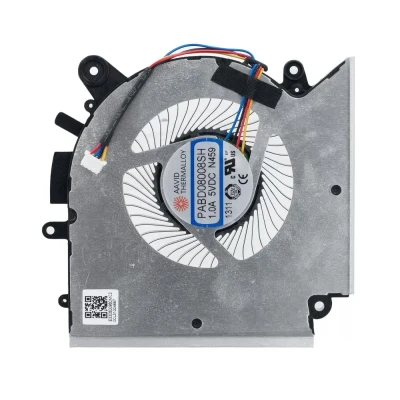
GPU


MSI GF76 GF66 GL76 GL66 MS-1581 MS-1583 PAAD06015SL-N460 GPU Fan original (Part Number: PAAD06015SL-N460) is a high‑quality replacement cooling fan engineered for laptop thermal systems. This fan is manufactured to meet the specifications of major OEM brands such as Delta, Sunon, Nidec, AVC, Foxconn, and others. Proper identification of your original fan's brand and part number (PN) is the most reliable way to ensure a perfect match.
Technical Specifications:
| Attribute | Value |
|---|---|
| Compatible part number | E330401790MC2 E33-0401790-MC2 PAAD06015SL-N460 |
| Compatible models | MSI GF76 Katana 11UE MSI GF76 Katana 11UEK MSI GL76 Pulse 11UE MSI GL76 Pulse 11UEK MSI Katana GF66 11UE MSI Katana GF66 11UEK MSI Katana GF66 12UE MSI Katana GF66 12UG MSI Katana GF66 12UGS MSI Katana GF76 11UC Series MSI Katana GF76 11UD Series MSI Katana GF76 12UC MSI Katana GF76 12UD MSI Katana GF76 12UE MSI Katana GF76 12UG MSI Katana GF76 12UGS MSI Katana 17 B11UCX MSI Pulse GL66 11UE MSI Pulse GL66 11UEK MSI Pulse GL66 12UE MSI Pulse GL66 12UEK MSI Pulse GL76 12UEK MSI Sword 15 A11UE MSI Sword 17 A11UE Katana Gf66 12uc Katana Gf66 12uck Katana Gf66 12uco Katana Gf66 12ucok Katana Gf66 12ud Katana Gf66 12udk Katana Gf66 12udo Katana Gf66 12udok Katana Gf66 12ue Katana Gf66 12ueo Katana Gf66 12uek Katana Gf66 12ug Crosshair 17 A11 Series Crosshair 17 A11UCK Crosshair 17 A11UDK Crosshair 17 A11UEK Crosshair 17 B12 Series Crosshair 17 B12UEZ Crosshair 17 B12UGSZ Crosshair 17 B12UGZ Crosshair 17 B12UEZO Crosshair 17 B12UGSZO Crosshair 17 B12UGZO Crosshair 17 C12 Series Crosshair 17 C12VE Crosshair 17 C12VF Crosshair 17 C12VG MSI MS-17L2 MSI Katana 17 B11U ( 11th Gen Intel Core processor / GeForce RTX 20 Series ) MSI Katana 17 B11UCX MSI Katana GF76 ( 11th Gen Intel Core processor / GeForce GTX 16 Series ) MSI Katana GF76 11SC MSI Sword 17 A11S ( 11th Gen Intel Core processor / GeForce GTX 16 Series ) MSI Sword 17 A11SC MSI WF76 Mobile Workstation ( 11th Gen Intel Core processor ) MSI WF76 11UI MSI WF76 11UJ Katana 17 B12VEK Katana 17 B12VGK Katana 17 B12VFK Alpha 15 B5EEK Katana 15 B13VEK Katana 15 B13VFK Katana 15 B13VGK Sword 17 A11UE Sword 15 A11UE MSI Crosshair 15 ( 11th Gen Intel Core processor / GeForce RTX 30 Series ) MSI Crosshair 15 A11UCK MSI Crosshair 15 A11UDK MSI Crosshair 15 A11UEK MSI Sword 15 ( 11th Gen Intel Core processor / GeForce RTX 30 series ) MSI Sword 15 A11UC MSI Sword 15 A11UD MSI Sword 15 A11UE MSI Sword 15 A11UG |
Why Brand & PN Matter:
EG50060S1-C710-S9A) uniquely identifies the exact fan model. Matching PN guarantees fitment.How to Identify Your Fan:
Still unsure? Take a clear photo of your fan's sticker (top view) and the connector, then send it to our support team. We'll identify the brand and PN for you, and confirm compatibility.

Every fan we sell is inspected for brand authenticity, PN correctness, voltage/current accuracy, speed (RPM), and noise level. We cross‑check each unit against our compatibility database to ensure it matches the listed specifications and will function correctly in your laptop.